
Operating system
Windows 10 / 11, macOS (Intel + Apple Silicon),
or Linux (x86_64 / arm64).
Browy comes in two parts:
Install the extension from the Chrome Web Store, then run the one-line installer for the native host.
Operating system
Windows 10 / 11, macOS (Intel + Apple Silicon),
or Linux (x86_64 / arm64).
Browser
A Chromium browser:
Chrome 114+, Edge 114+, or Brave.
LLM access
A GitHub Copilot subscription.
Browy uses your existing Copilot.
Pin the Browy toolbar icon so the side panel is one click away.
Open PowerShell and run:
irm https://github.com/BrowyHQ/browy/releases/latest/download/install.ps1 | iexThe installer will:
%LOCALAPPDATA%\Browy\app\com.browy.host with Chrome / Edge / Brave (pre-approves both the Web Store and unpacked extension IDs)%USERPROFILE%\Downloads\Browy-Extension\ for sideload installsOpen Terminal and run:
curl -fsSL https://github.com/BrowyHQ/browy/releases/latest/download/install.sh | bashThe installer will:
~/.browy/app/com.browy.host with Chrome / Edge / Brave (pre-approves both the Web Store and unpacked extension IDs)~/Downloads/Browy-Extension/ for sideload installsOpen a terminal and run:
curl -fsSL https://github.com/BrowyHQ/browy/releases/latest/download/install.sh | bashThe installer will:
x86_64 or aarch64) and download the matching tarball (~165 MB)~/.browy/app/com.browy.host with Chrome / Edge / Brave (writes to ~/.config/<browser>/NativeMessagingHosts/, pre-approves both extension IDs)~/Downloads/Browy-Extension/ for sideload installsClick the Browy icon to open the side panel. The first time you use it, Browy will prompt you to sign in.
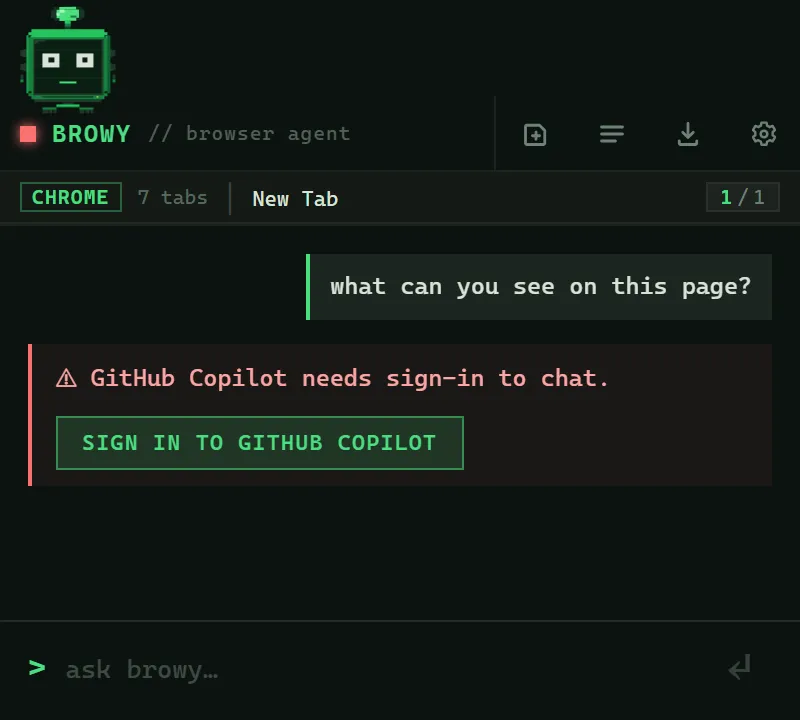
A terminal window opens with the GitHub Copilot device-flow link. Paste the code into the URL it shows, authorize Browy in your browser, and the terminal closes itself.
You’re done. Try your first chat for five concrete examples.
Re-run the installer. It detects your existing install and updates it in place, keeping your chats and settings. When the Web Store updates the extension past your backend, the side panel shows a yellow browy backend is out of date banner with a button that copies this command for you.
irm https://github.com/BrowyHQ/browy/releases/latest/download/install.ps1 | iexcurl -fsSL https://github.com/BrowyHQ/browy/releases/latest/download/install.sh | bashThe side panel reconnects to the new backend on its own. If you
sideloaded the extension, also reload it in chrome://extensions/
(the circular ↻ icon on the Browy card) to pick up the new extension
files. Web Store installs update themselves.
chrome://extensions/%LOCALAPPDATA%\Browy\, %USERPROFILE%\.browy\, and %USERPROFILE%\.browseragent\ (the host log)%LOCALAPPDATA%\Google\Chrome\User Data\NativeMessagingHosts\com.browy.host.json
(and the equivalent under Edge / Brave folders)chrome://extensions/~/.browy/app/uninstall.sh && rm -rf ~/.browy ~/.browseragent ~/Downloads/Browy-Extension~/Library/Application Support/Google/Chrome/NativeMessagingHosts/
(and the equivalent for Edge / Brave).chrome://extensions/~/.browy/app/uninstall.sh && rm -rf ~/.browy ~/.browseragent ~/Downloads/Browy-Extension~/.config/google-chrome/NativeMessagingHosts/ (and the equivalent
for Edge / Brave).I'll write when there's a new version worth trying. Unsubscribe any time.
Rather get them on GitHub? Watch BrowyHQ/browy and choose Custom, then Releases.